Processing
1.1 What is Processing?
Processing is an open-source programming language and integrated development environment (IDE) designed to help students, designers, artists, and creators learn programming through visual arts. It is based on Java but offers simplified syntax and graphical tools to make programming more intuitive and accessible. The core goal of Processing is to present the results of programming through graphics and interactivity, and it is widely used in art creation, interaction design, animation, and visual art display.
Processing is particularly well-suited for creating graphics, visual design, and interactive art. Its simplicity makes it easy for people with no programming background to quickly get started and bring their ideas to life.
1.2 Tool Comparison
| Feature | Processing | p5.js | TD (TouchDesigner) | OpenFrameworks | Cinder |
|---|---|---|---|---|---|
| Programming Language | Java | JavaScript | Visual programming (Node-based) | C++ | C++ |
| Environment | Standalone IDE | Web Browser (HTML5) | Dedicated Software | Cross-platform library | Cross-platform library |
| Graphics Support | Powerful graphics library | Web graphics, Canvas | Real-time rendering and complex effects | High-performance graphics and UI | Powerful graphics library |
| Interaction Support | Keyboard and mouse input | Mouse, keyboard, touch | Multiple input devices | Multiple input devices | Multiple input devices |
| Difficulty | Moderate | Easy | Advanced/Artist-friendly | Advanced/Developer-friendly | Advanced/Developer-friendly |
| Application Areas | Art creation, interaction design | Web art, interactive animation | Digital art, stage design | Art, games, visualization | Games, visualization |
1.3 p5.js
p5.js is the JavaScript version of Processing, designed to enable more people to create graphics, animations, and interactive applications in the web browser. Compared to Processing, p5.js uses JavaScript, which allows it to run in a web environment and utilize HTML5 Canvas and other web APIs to create interactive works.
1.3.1 Features of p5.js:
- Graphics and Animation: p5.js provides easy-to-understand graphic programming tools for drawing simple shapes or creating complex animations.
- Interactivity: p5.js supports mouse and keyboard input, allowing for the addition of interactive elements and user interaction experiences.
- Simple Syntax: p5.js is designed with simple and easy-to-understand syntax, allowing even those with no programming experience to quickly start creating.
- Rich Community Support: p5.js has an active community of developers and artists who share code, works, and tutorials, fostering mutual learning and inspiration.
1.4 TouchDesigner (TD)
TD (TouchDesigner) is a graphical programming platform for real-time interactive visual art creation. It is ideal for digital art, stage design, and interactive installations, allowing users to implement complex visual effects and interactive functions without traditional coding. TD combines visual programming with node-based systems, enabling creators to implement ideas by dragging and connecting different modules.
1.4.1 Features of TD:
- Real-time: TD is designed for real-time creation, supporting complex visual effects, audio response, and interactive real-time processing.
- Node-based Programming: TD uses a node system for programming, so users do not need to write large amounts of code. Interaction and effects can be implemented by configuring and connecting nodes.
- Strong Interactivity: Supports a variety of input devices (e.g., touchscreen, Kinect, sensors), making it easy to design highly interactive visual experiences.
- Graphical Interface: The interface is intuitive and supports real-time debugging, making it suitable for designers and artists.
TouchDesigner Official Website
1.5 OpenFrameworks
OpenFrameworks is a C++ toolkit designed to provide a convenient environment for artists, designers, and developers to engage in creative coding. It provides powerful features for graphics, video, audio, and sensors, and simplifies complex C++ programming to allow developers to focus on creation.
1.5.1 Features of OpenFrameworks:
- Cross-platform: Supports development on Windows, Mac, Linux, iOS, and Android.
- High Performance: The high performance of C++ makes OpenFrameworks perfect for projects that require high frame rates and complex computations, such as graphics, animations, and games.
- Flexibility: OpenFrameworks provides high flexibility for developers, allowing almost any idea to be realized.
- Strong Extension Libraries: Supports a variety of extension libraries for visual creation, audio processing, 3D modeling, and more.
OpenFrameworks Official Website
1.6 Cinder
Cinder is a C++ library designed to provide powerful support for creative programming. It is suitable for high-performance, real-time visual art creation and has strong community support. Cinder is ideal for developers and designers involved in artistic creation, particularly in graphics, audio, and multimedia projects.
1.6.1 Features of Cinder:
- High-performance Graphics Library: Cinder offers powerful graphics rendering capabilities suitable for real-time rendering.
- Cross-platform Support: Supports Windows, MacOS, and Linux.
- Graphics and UI Design: Helps developers create complex user interfaces and interactive systems.
- Strong Community Support: Cinder has a large community of developers and creators who provide tutorials, example code, and plugins.
2. Psychological Sand Table Test
Step 1: Establish File
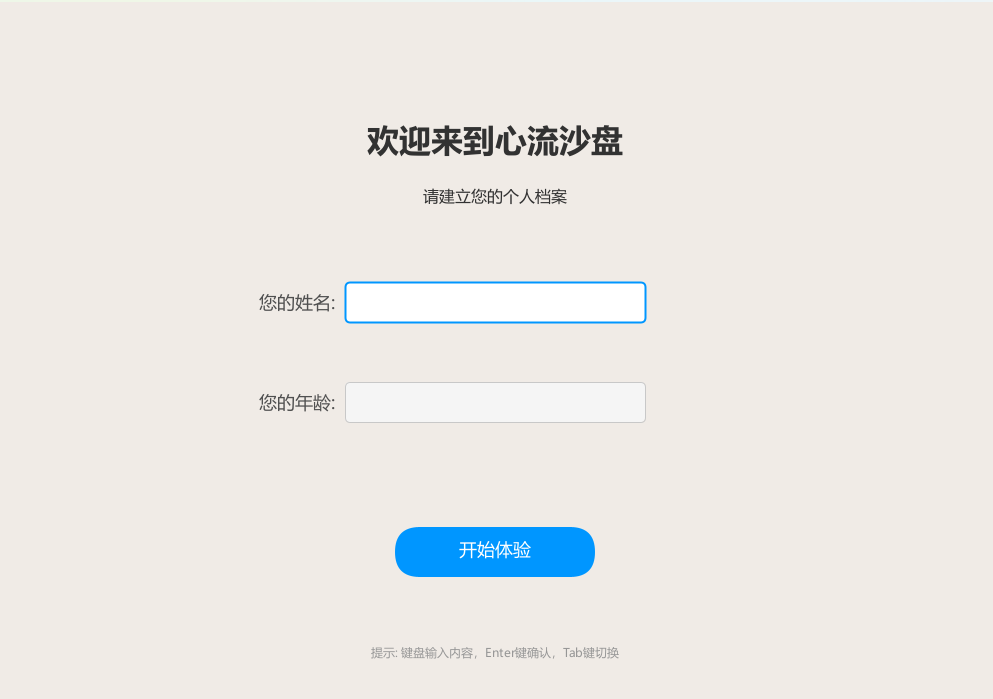
Step 2: Start Observing Object
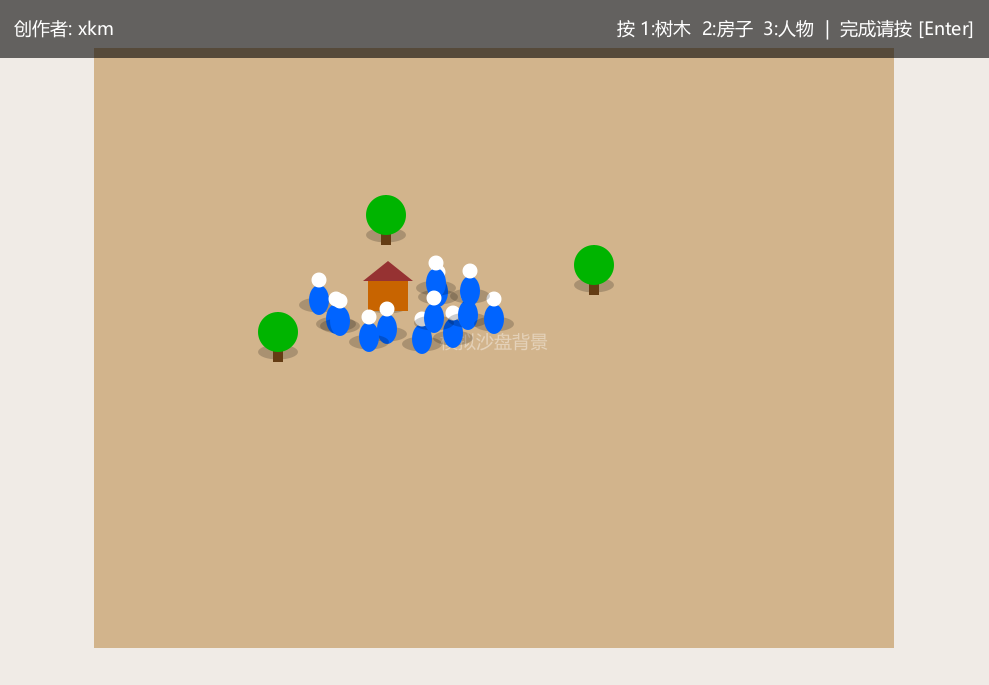
Step 3: Detect Object
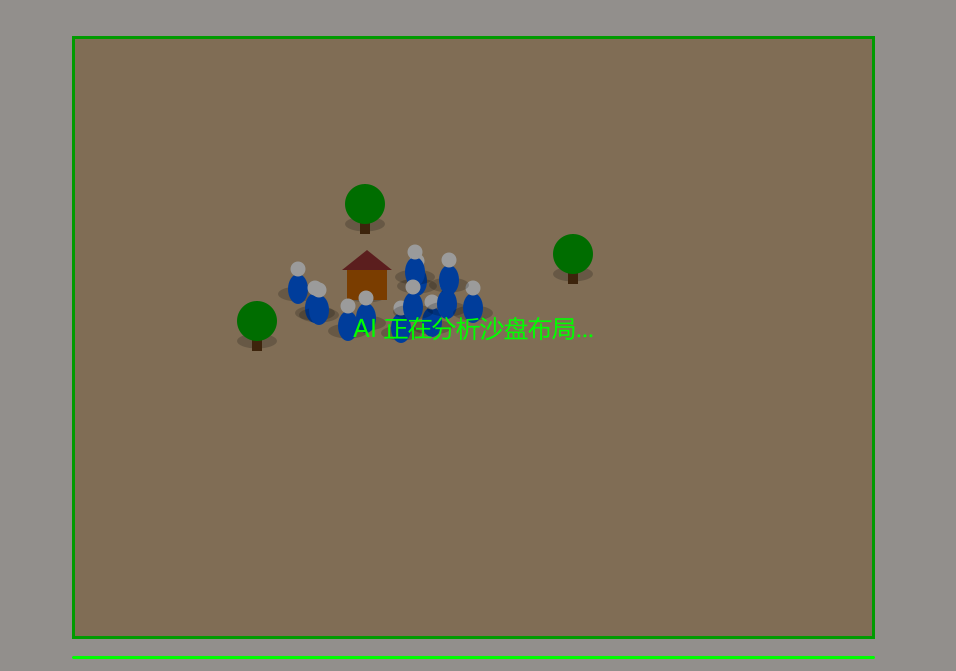
Step 4: Perform Definition
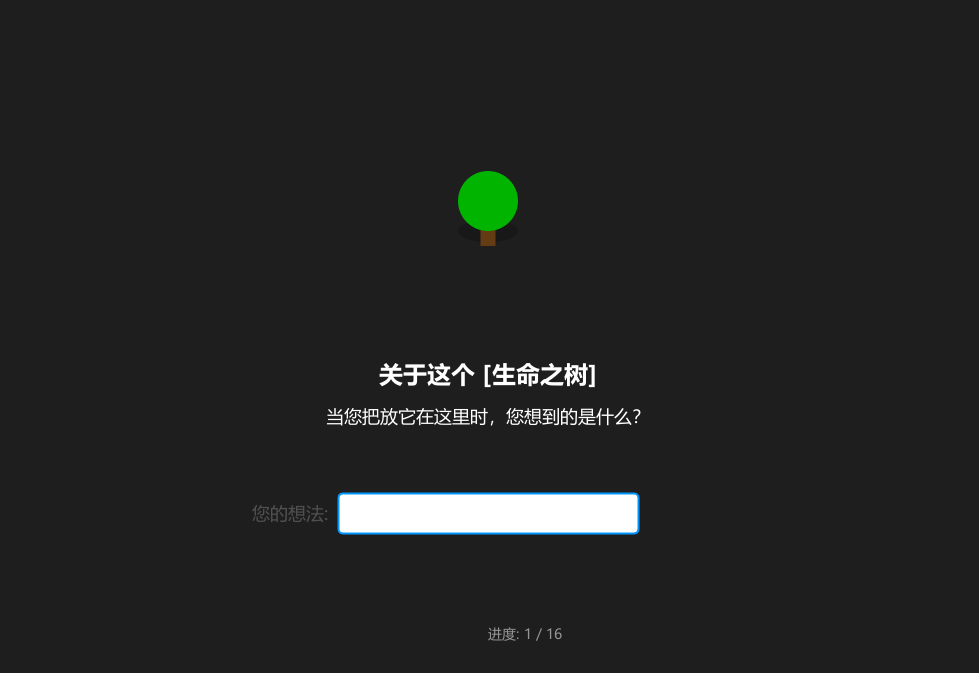
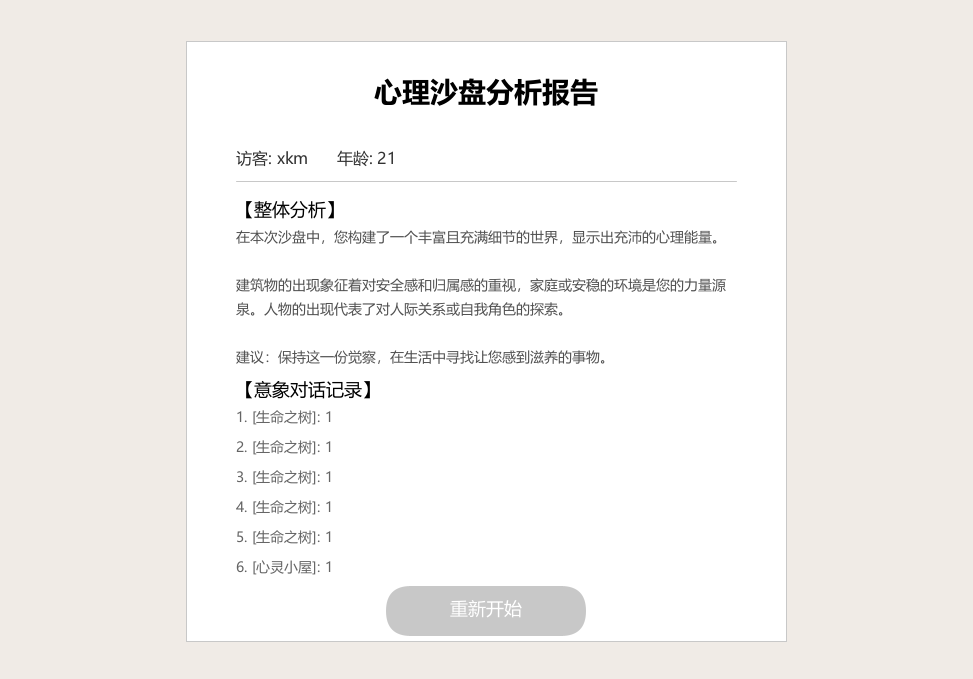
Step 5: Generate Report
Source Code
/*
 * 项目名称:心流沙盘 - 家庭应用版


import processing.video.*;

// --- 全局配置 ---
boolean useCamera = true;

// --- 系统状态 ---
final int STATE_PROFILE = 0;
final int STATE_PLAY    = 1;
final int STATE_SCAN    = 2;
final int STATE_INQUIRY = 3;
final int STATE_REPORT  = 4;

int currentState = STATE_PROFILE;

// --- 核心对象 ---
Capture cam;
PFont mainFont, titleFont;

// --- 用户数据 ---
String userName = "";
String userAge = "";
String currentTyping = "";
int inputFocus = 0;

// --- 沙盘数据 ---
ArrayList<SandObject> objects;
int currentInquiryIndex = 0;
String[] userAnswers;

// --- 动画变量 ---
float scanLineY = 0;

void setup() {
  size(1000, 700);

  // 1. 字体设置
  try {
    mainFont = createFont("Microsoft YaHei", 16);
    titleFont = createFont("Microsoft YaHei Bold", 32);
    textFont(mainFont);
  } catch(Exception e) {
    println("字体加载失败");
  }

  // 2. 摄像头初始化
  if (useCamera) {
    String[] cameras = Capture.list();
    if (cameras.length > 0) {
      int idx = 0;
      for(int i=0; i<cameras.length; i++) if(cameras[i].contains("USB")) idx = i;
      cam = new Capture(this, 640, 480, cameras[idx]);
      cam.start();
    } else {
      useCamera = false;
    }
  }

  objects = new ArrayList<SandObject>();
}

void draw() {
  background(240, 235, 230); // 纸张底色

  switch(currentState) {
    case STATE_PROFILE: drawProfileScreen(); break;
    case STATE_PLAY:    drawPlayScreen();    break;
    case STATE_SCAN:    drawScanScreen();    break;
    case STATE_INQUIRY: drawInquiryScreen(); break;
    case STATE_REPORT:  drawReportScreen();  break;
  }
}

// ==========================================
// ==========================================
void drawReportScreen() {
  // 1. 绘制卡片背景
  fill(255); stroke(200); strokeWeight(1);
  rectMode(CENTER); // 卡片本身居中绘制
  rect(width/2, height/2, 600, 600); // 宽600, 高600

  // 2. 绘制标题
  fill(0); textAlign(CENTER, CENTER);
  textFont(titleFont); textSize(28);
  text("心理沙盘分析报告", width/2, 100);


  rectMode(CORNER);
  textAlign(LEFT, TOP); // 左对齐,顶对齐
  textFont(mainFont); textSize(16);

  // 定义内容的边界
  float contentLeft = width/2 - 250; // 卡片左边缘往里一点 (500-250=250)
  float contentWidth = 500;          // 文字内容的宽度
  float cursorY = 160;               // 当前行的 Y 坐标

  // 3. 基本信息
  fill(50);
  text("访客: " + userName + "      年龄: " + userAge, contentLeft, cursorY);

  stroke(200); strokeWeight(1);
  line(contentLeft, cursorY + 30, contentLeft + contentWidth, cursorY + 30);
  cursorY += 50;

  // 4. 整体分析
  fill(0); textSize(18);
  text("【整体分析】", contentLeft, cursorY);
  cursorY += 30;

  String aiAnalysis = generateAIAnalysis();
  fill(80); textSize(14); textLeading(24);
  // 使用文本框绘制,确保自动换行
  text(aiAnalysis, contentLeft, cursorY, contentWidth, 200);
  cursorY += 150; // 给分析文字预留空间

  // 5. 对话记录
  fill(0); textSize(18);
  text("【意象对话记录】", contentLeft, cursorY);
  cursorY += 30;

  textSize(14); fill(100);
  // 遍历并显示记录
  for (int i=0; i<objects.size(); i++) {
    if (cursorY > height - 120) break; // 防止写出卡片底部

    String itemText = (i+1) + ". [" + objects.get(i).getName() + "]: " + userAnswers[i];

    // 这里使用带宽度的 text,如果用户写了很多字,它会自动换行,不会跑出屏幕
    text(itemText, contentLeft, cursorY, contentWidth, 60);

    cursorY += 30; // 每一行下移 30 像素
  }

  // 6. 底部按钮 (切换回 CENTER 方便画按钮)
  rectMode(CENTER);
  drawButton("重新开始", width/2, height - 80, false);
}

// ==========================================
// 其他页面 (保持原样或微调)
// ==========================================

void drawProfileScreen() {
  fill(50); textAlign(CENTER);
  textFont(titleFont); text("欢迎来到心流沙盘", width/2, 150);
  textFont(mainFont);  text("请建立您的个人档案", width/2, 200);
  drawInputBox("您的姓名:", width/2, 300, userName, inputFocus == 0);
  drawInputBox("您的年龄:", width/2, 400, userAge,  inputFocus == 1);
  drawButton("开始体验", width/2, 550, true);
  fill(150); textSize(12); text("提示: 键盘输入内容,Enter键确认,Tab键切换", width/2, 650);
}

void drawInputBox(String label, float x, float y, String value, boolean isFocused) {
  fill(80); textSize(18); textAlign(RIGHT, CENTER);
  text(label, x - 160, y); // 垂直居中

  if (isFocused) { stroke(0, 150, 255); strokeWeight(2); fill(255); }
  else { stroke(200); strokeWeight(1); fill(245); }

  rectMode(CENTER);
  rect(x, y, 300, 40, 5);

  fill(0); textAlign(LEFT, CENTER);
  text(value + (isFocused && frameCount % 60 < 30 ? "|" : ""), x - 140, y - 3);
}

void drawPlayScreen() {
  if (useCamera && cam.available()) {
    cam.read(); imageMode(CENTER); image(cam, width/2, height/2, 800, 600);
  } else {
    fill(210, 180, 140); noStroke(); rectMode(CENTER); rect(width/2, height/2, 800, 600);
    fill(255, 100); textAlign(CENTER); text("模拟沙盘背景", width/2, height/2);
  }
  for (SandObject obj : objects) obj.display();
  drawOverlayUI();
}

void drawOverlayUI() {
  fill(0, 150); noStroke(); rectMode(CORNER); rect(0, 0, width, 60);
  fill(255); textAlign(LEFT, CENTER); textSize(18); text("创作者: " + userName, 20, 30);
  textAlign(RIGHT, CENTER); text("按 1:树木  2:房子  3:人物  |  完成请按 [Enter]", width-20, 30);
}

void drawScanScreen() {
  if (useCamera) { imageMode(CENTER); image(cam, width/2, height/2, 800, 600);
  else { fill(210, 180, 140); rectMode(CENTER); rect(width/2, height/2, 800, 600); }
  for (SandObject obj : objects) obj.display();

  fill(0, 100); rectMode(CORNER); rect(0,0,width,height);
  stroke(0, 255, 0); strokeWeight(3); line(100, scanLineY, width-100, scanLineY);
  scanLineY += 5;
  if (scanLineY > height) {
    scanLineY = 0;
    userAnswers = new String[objects.size()];
    for(int i=0; i<userAnswers.length; i++) userAnswers[i] = "";
    currentState = STATE_INQUIRY;
  }
  fill(0, 255, 0); textAlign(CENTER); textSize(24); text("AI 正在分析沙盘布局...", width/2, height/2);
}

void drawInquiryScreen() {
  if (objects.size() == 0) { currentState = STATE_REPORT; return; }
  background(30);
  SandObject currentObj = objects.get(currentInquiryIndex);
  pushMatrix(); translate(width/2, height/3); scale(1.5); currentObj.displayAt(0, 0); popMatrix();

  fill(255); textAlign(CENTER); textFont(titleFont); textSize(24);
  text("关于这个 [" + currentObj.getName() + "]", width/2, height/2 + 50);
  textFont(mainFont); textSize(18);
  text("当您把放它在这里时,您想到的是什么?", width/2, height/2 + 90);
  drawInputBox("您的想法:", width/2, height/2 + 180, currentTyping, true);
  textSize(14); fill(150); text("进度: " + (currentInquiryIndex+1) + " / " + objects.size(), width/2, height - 50);
}

// 规则逻辑
String generateAIAnalysis() {
  int treeCount = 0; int houseCount = 0; int peopleCount = 0;
  for(SandObject o : objects) { if(o.type == 0) treeCount++; if(o.type == 1) houseCount++; if(o.type == 2) peopleCount++; }
  String report = "在本次沙盘中,";
  if (objects.size() > 5) report += "您构建了一个丰富且充满细节的世界,显示出充沛的心理能量。";
  else report += "您构建了一个简洁集中的世界,显示出清晰的关注点。";
  report += "\n\n";
  if (treeCount > houseCount) report += "大量的植物意象表明您当前极其渴望成长与生机,可能正在经历内在的蜕变。";
  if (houseCount > 0) report += "建筑物的出现象征着对安全感和归属感的重视,家庭或安稳的环境是您的力量源泉。";
  if (peopleCount > 0) report += "人物的出现代表了对人际关系或自我角色的探索。";
  report += "\n\n建议:保持这一份觉察,在生活中寻找让您感到滋养的事物。";
  return report;
}

// 交互逻辑
void keyPressed() {
  if (key == ESC) key = 0;
  if (currentState == STATE_PROFILE) handleProfileInput();
  else if (currentState == STATE_PLAY) handlePlayInput();
  else if (currentState == STATE_INQUIRY) handleInquiryInput();
  else if (currentState == STATE_REPORT && (key == ENTER || key == ' ')) resetSystem();
}

void handleProfileInput() {
  if (key == ENTER || key == RETURN) { if (userName.length() > 0) currentState = STATE_PLAY; }
  else if (key == TAB) inputFocus = (inputFocus + 1) % 2;
  else if (key == BACKSPACE) {
    if (inputFocus == 0 && userName.length() > 0) userName = userName.substring(0, userName.length()-1);
    if (inputFocus == 1 && userAge.length() > 0) userAge = userAge.substring(0, userAge.length()-1);
  } else if (key != CODED) {
    if (inputFocus == 0) userName += key; if (inputFocus == 1) userAge += key;
  }
}

void handlePlayInput() {
  if (key == '1') objects.add(new SandObject(mouseX, mouseY, 0));
  if (key == '2') objects.add(new SandObject(mouseX, mouseY, 1));
  if (key == '3') objects.add(new SandObject(mouseX, mouseY, 2));
  if (key == ENTER || key == RETURN) { scanLineY = 0; currentState = STATE_SCAN; }
}

void handleInquiryInput() {
  if (key == ENTER || key == RETURN) {
    userAnswers[currentInquiryIndex] = currentTyping;
    currentTyping = ""; currentInquiryIndex++;
    if (currentInquiryIndex >= objects.size()) currentState = STATE_REPORT;
  } else if (key == BACKSPACE) {
    if (currentTyping.length() > 0) currentTyping = currentTyping.substring(0, currentTyping.length()-1);
  } else if (key != CODED) currentTyping += key;
}

void mousePressed() {
  if (currentState == STATE_PROFILE) {
    if (mouseY > 280 && mouseY < 320) inputFocus = 0;
    if (mouseY > 380 && mouseY < 420) inputFocus = 1;
    if (mouseY > 530 && mouseY < 570 && userName.length() > 0) currentState = STATE_PLAY;
  }
  if (currentState == STATE_REPORT && mouseY > height - 120) resetSystem();
}

void resetSystem() {
  currentState = STATE_PROFILE; userName = ""; userAge = ""; objects.clear(); currentInquiryIndex = 0; currentTyping = "";
}

void drawButton(String label, float x, float y, boolean active) {
  rectMode(CENTER);
  if (active) fill(0, 150, 255); else fill(200);
  noStroke(); rect(x, y, 200, 50, 25);
  fill(255); textAlign(CENTER, CENTER); textSize(18); text(label, x, y - 3);
}

class SandObject {
  float x, y; int type; color c;
  SandObject(float x, float y, int t) { this.x = x; this.y = y; this.type = t;
    if (type == 0) c = color(0, 150, 0); if (type == 1) c = color(200, 100, 0); if (type == 2) c = color(0, 100, 255); }
  String getName() { if (type == 0) return "生命之树"; if (type == 1) return "心灵小屋"; if (type == 2) return "探索者"; return "未知"; }
  void displayAt(float px, float py) { pushMatrix(); translate(px, py); displayShape(); popMatrix(); }
  void display() { pushMatrix(); translate(x, y); displayShape(); popMatrix(); }
  void displayShape() { noStroke(); fill(0, 50); ellipse(0, 10, 40, 15); fill(c);
    if (type == 0) { rectMode(CENTER); fill(100,60,20); rect(0,10,10,20); fill(0,180,0); ellipse(0,-10,40,40); }
    else if (type == 1) { rectMode(CENTER); rect(0,0,40,30); fill(150,50,50); triangle(-25,-15, 0,-35, 25,-15); }
    else { fill(0,100,255); ellipse(0,5,20,30); fill(255); ellipse(0,-15,15,15); } }
}